 IceCalc
Personal finance for Kenya
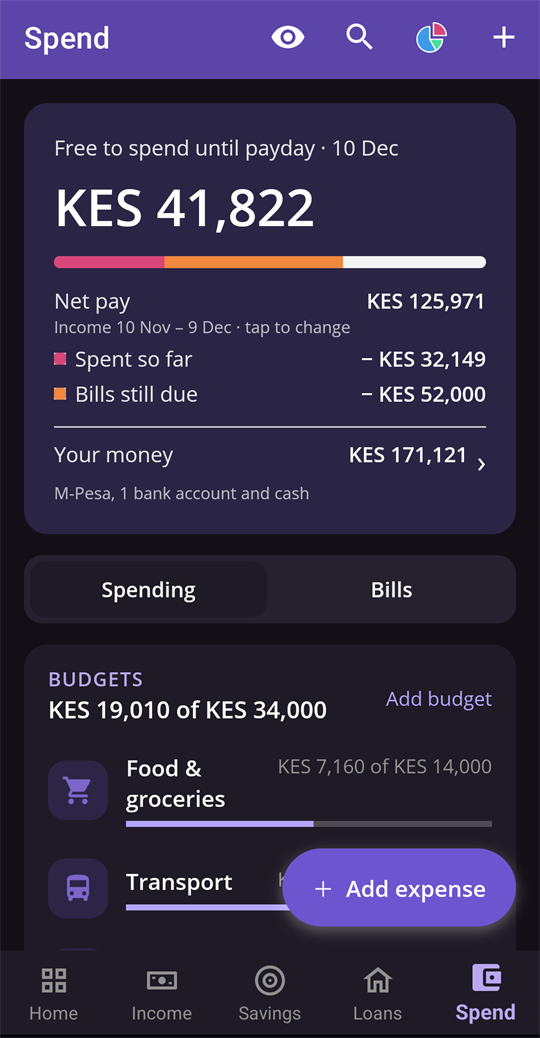
Know what's free to spend until payday.
IceCalc shows what you can really spend until payday, after your bills, and where every shilling goes. PAYE, NSSF, SHIF and the housing levy are worked out for you.
Free on Android · No adverts · Works without an account

On a computer? Scan with your phone's camera to get IceCalc.
Why IceCalc
Built for how Kenyans get paid and pay.
For salaried people and anyone with income from rent, a business, farming or side jobs, who pays with M-Pesa, bank and cards and wants to know where the money goes, without keeping a spreadsheet.
Logging takes seconds
Share or paste M-Pesa, bank and card messages and IceCalc fills in the rest. It never reads your SMS.
One honest number
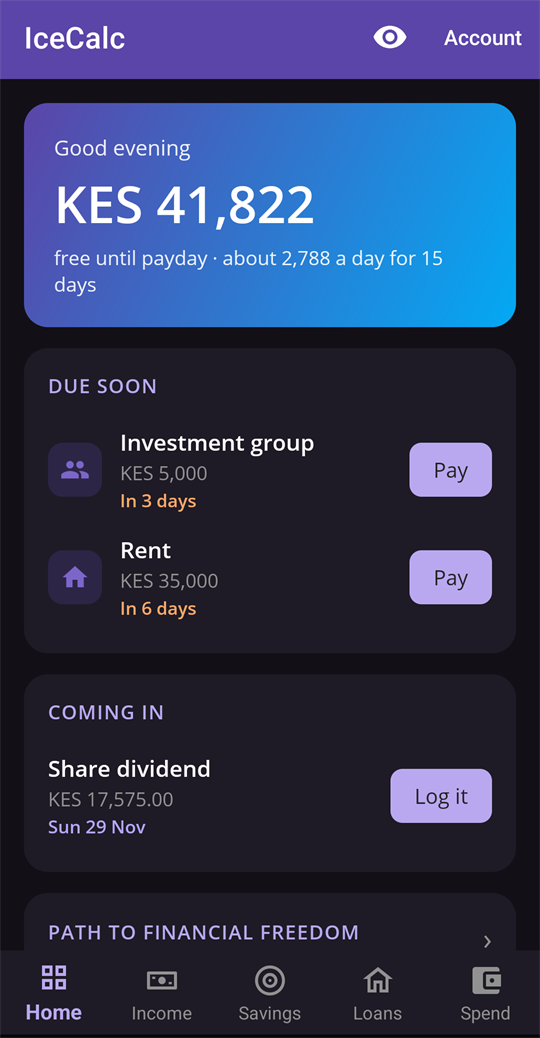
Free to spend until payday: your pay, minus what you've spent, minus the bills still to come.
Bills that remind you
Before the due day and on the day, with the paybill and account number ready to copy.
Made for Kenyan pay
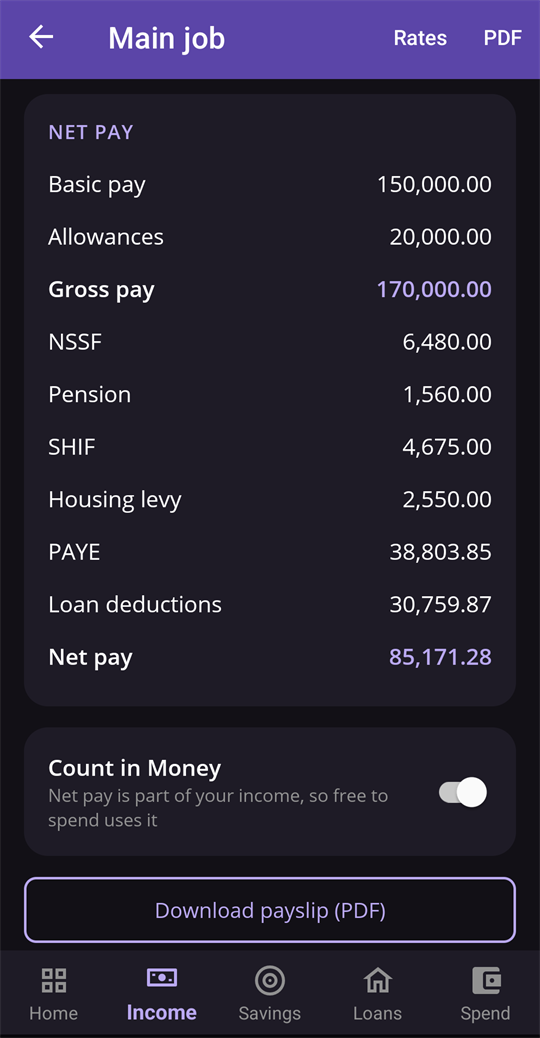
PAYE, NSSF, SHIF and the housing levy at current rates, with a payslip you can save.
The whole picture
Income, spending, bills, cards, savings, loans, your accounts and your net worth in one place.
Private by design
Works without an account, hides amounts with one tap, locks with your fingerprint. No adverts.
How it works
A few seconds a day, and you always know where you stand.
Log a payment in seconds
- Pay as usualWith M-Pesa, your bank or a card.
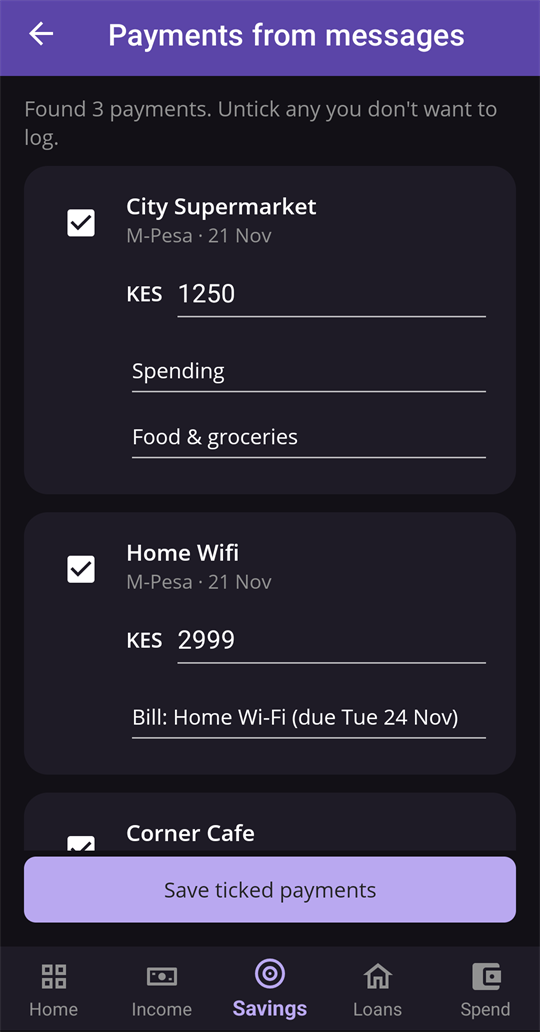
- Share the message to IceCalcFrom Messages, or copy it and tap Paste. Paste several at once and save them together.
- It's filled in for youThe amount, payee, date and reference, with the category or the bill it pays suggested.
- SaveFree to spend and your account balance update straight away.
IceCalc never reads your SMS and doesn't ask for SMS permission. Find any payment later by payee, M-Pesa code or amount.
Payday to payday
- Tell IceCalc your salary and paydayOr let the payroll calculator work out your pay.
- Each payday a new period startsYour pay, minus the bills due before the next payday, is what you can plan with.
- Stay on trackAs you log spending, "free to spend" and "about X a day" keep you there. Budgets warn you at 80%.
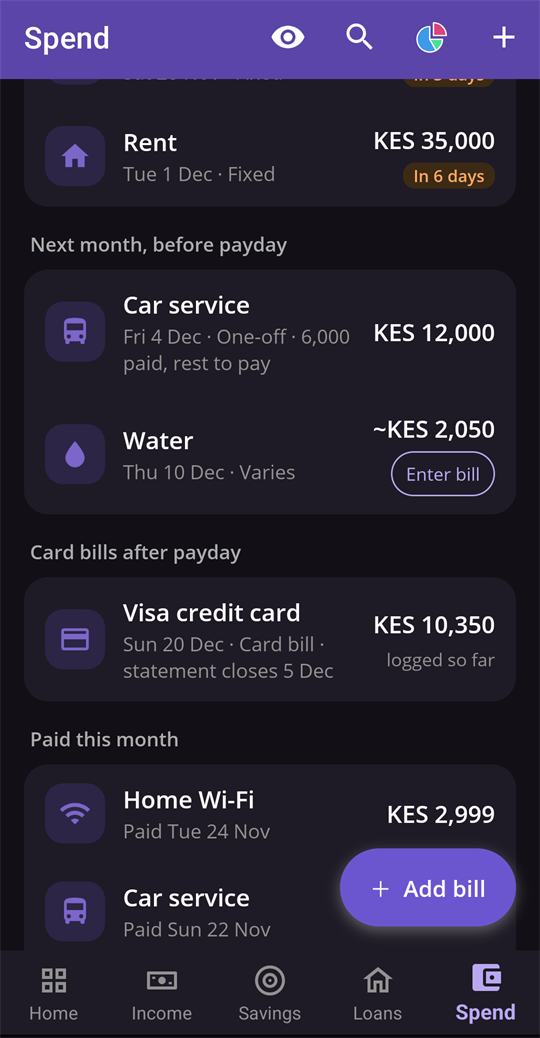
Never miss a bill
- Add a bill onceRent, water, Wi-Fi, school fees, chama, insurance: monthly, every 3 months, yearly or every school term.
- Get remindedBefore it's due and on the day, with the paybill and account number ready to copy and "Mark paid" in the notification.
- Share the payment message to mark it paidNext time IceCalc recognises who you paid, even the caretaker who collects the service fee.
New One-off bills, such as a school trip or a car service: pay in one go or in parts, and it counts in your bills until it's paid in full.
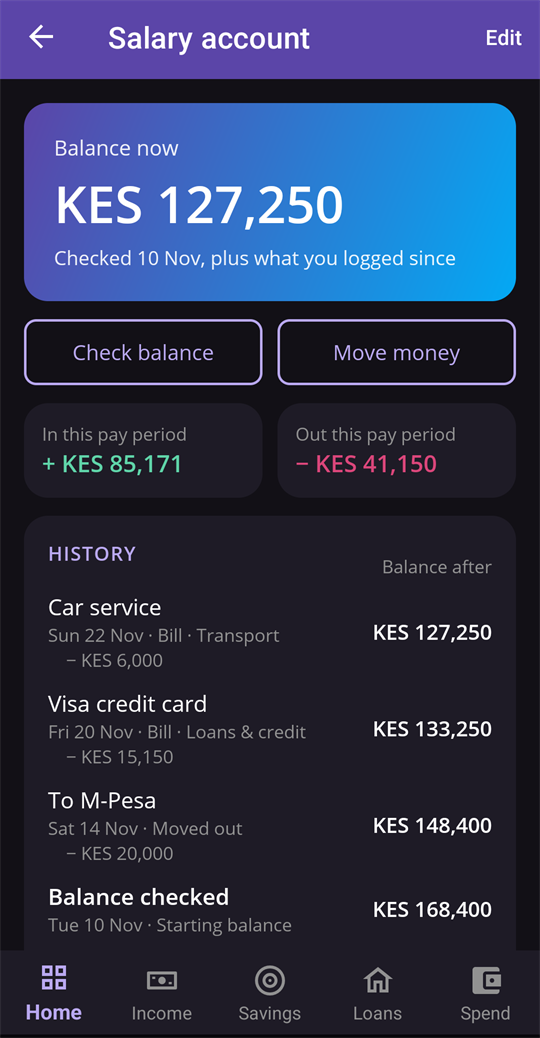
Know what you really have New
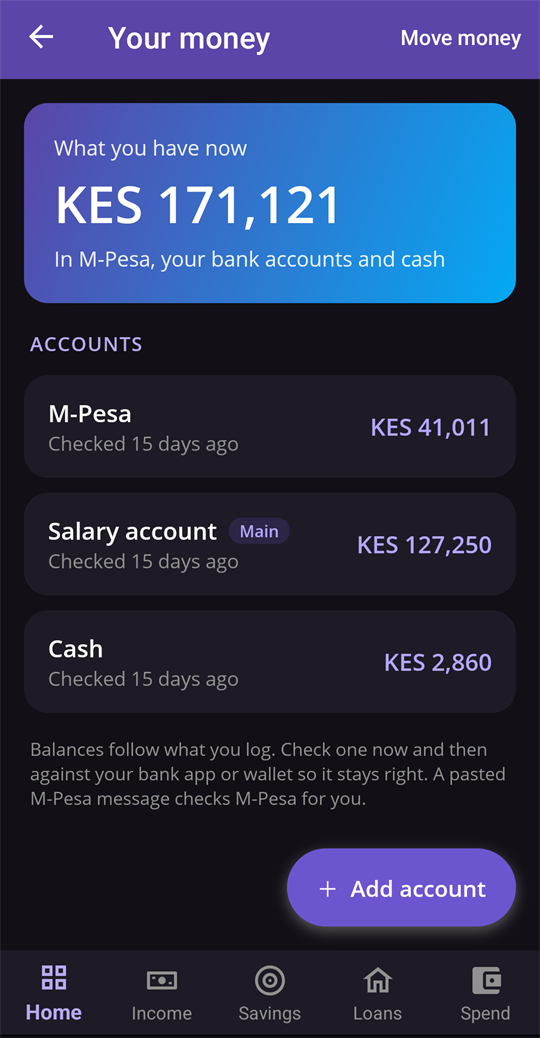
- Add M-Pesa, your bank accounts and cashWith what each holds today.
- Log as usualEach payment comes off the account that paid it, salary lands on payday, and money you move between accounts isn't counted as spending.
- Check now and thenCompare a balance with your bank app and IceCalc shows any difference. A pasted M-Pesa message checks M-Pesa for you.
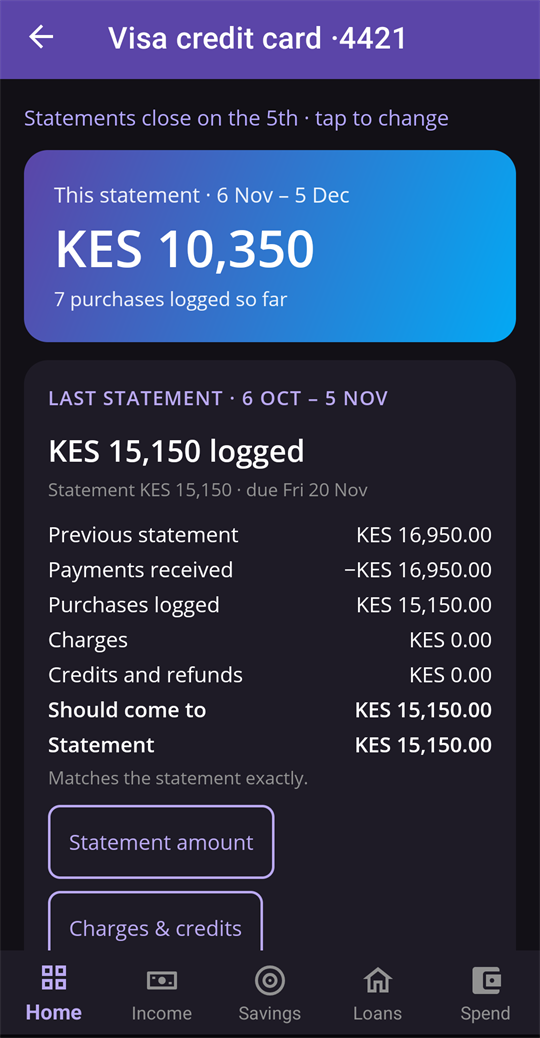
Credit cards without double counting
- Pay with your card and share the messageIceCalc knows each card by its last 4 digits, and asks once if it's a credit card.
- Purchases count when you make themPaying the card bill later isn't counted again.
- Statements that add upSet the day each statement closes and see it laid out like the bank's, with charges, credits and refunds. The card bill shows what you've logged so far.
Your pay after PAYE, worked out
The payroll calculator takes off PAYE, NSSF, SHIF and the housing levy at current Kenyan rates, with pension and reliefs, and gives you a payslip you can save as a PDF.
- Other income: rent, business, farming, side jobs and family support, with tax such as 7.5% rental income tax and charges like an agent's fee taken off.
- Expected income: an announced dividend or a sale going through, counted only when it arrives, even in parts.
- Job offer? Compare take-home pay, or work out the gross pay to ask for.
See where your money went
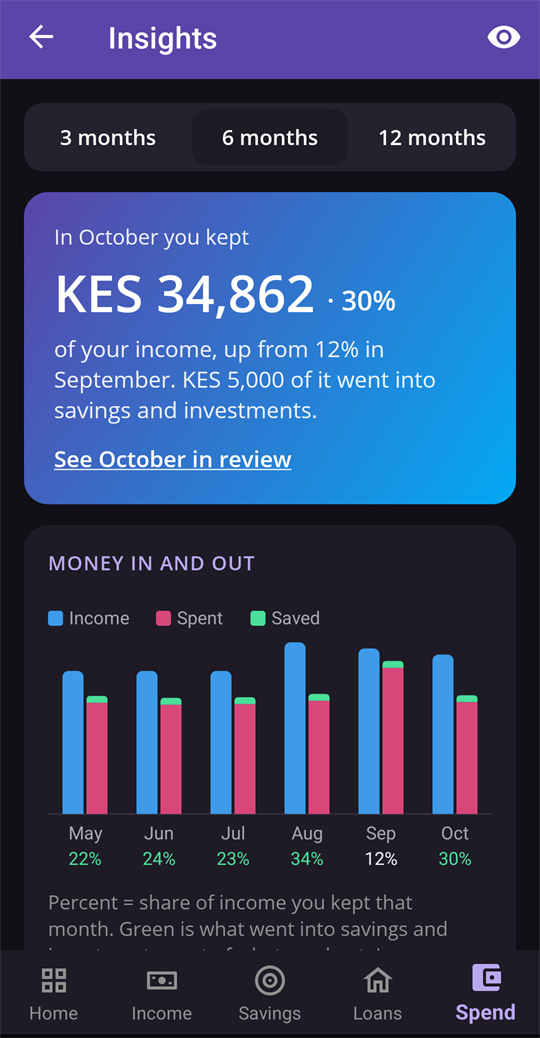
Each month, where your money went, what you kept, and what went into savings and investments. See which days cost the most, how you pay and where you spend most.
- Net worth: what you own, from your accounts and savings to land, a car or a business, minus what you owe, and how it's changing.
- A monthly review on the 1st, with what went well and one thing to try.
Loans
Installments, total interest, a full schedule and the effect of extra payments, including loans deducted from your pay. Compare offers side by side.
Savings
What your savings are worth today and will grow to, after withholding tax and charges, kept true with your statements.
Find any payment
Search by payee, M-Pesa code or amount, by month, by pay period or across all your history.
Your path
Seven steps to financial freedom.
Each step is worked out from your own numbers, so you always know what to do next.
- 1Know where your money goesLog your spending for a month to see your real pattern.
- 2Bills under controlEvery regular bill set up, and none paid late.
- 3A one-month cushionOne month of essentials set aside for emergencies.
- 4Clear expensive debtNo loans costing more than 15% a year.
- 5Three months savedEnough for 3 months of essentials if income stops.
- 6Invest for the future10–15% of income into a pension, SACCO shares, a money market fund or bonds.
- 7Financial freedomYour savings and investments could pay for your essentials.
General guidance to help you plan, not financial advice.
Private by design
Your money is your business.
No adverts and no third-party tracking. IceCalc doesn't sell your information. Read the privacy policy.
Never reads your SMS
No SMS permission. Messages are read on your phone only when you share or paste them, and the message itself isn't stored or sent.
Works without an account
Everything stays on your phone. Sign in with email or Google only to back up your records and use them on another phone.
Locked and hidden
Lock IceCalc with your fingerprint, face or phone PIN, hide it in recent apps, and hide amounts with one tap.
Questions
Frequently asked
Is IceCalc free?
Yes. IceCalc is free on Google Play, with no adverts, no subscriptions and no in-app purchases.
Does IceCalc read my messages?
No. It doesn't ask for SMS permission. When you share or paste a payment message, it's read on your phone, and only what you choose to save is kept: the amount, who you paid, the date and the reference.
Does it connect to my bank or M-Pesa?
No. IceCalc doesn't connect to your bank or M-Pesa, move money or lend. It's for planning and tracking: you log payments by sharing their messages, and check balances against your bank app now and then.
Do I need an account?
No, everything works without one. An account only backs up your records so you can use them on another phone.
Will my credit card spending be counted twice?
No. Card purchases count as spending when you make them, and paying the card bill isn't counted again.
Are the PAYE, NSSF, SHIF and housing levy figures official?
They're worked out at the current rates, but they're estimates for planning. Confirm your actual deductions with your employer or KRA.
Is there an iPhone or web version?
Not yet. IceCalc is for Android phones.
How do I delete my account?
In the app, go to Home › Account › Delete account. Or delete it on the web. Deletion takes effect immediately.
Start with this month.
Add your pay and your bills, and see what's really free to spend.
Get it on Google Play
Scan with your phone's camera